Pre-Chat Consent
Require visitors to agree to a disclaimer or consent text before they can start chatting. This is useful for GDPR compliance, HIPAA-adjacent workflows, or any scenario where you need explicit agreement before a conversation begins.
How to get there: Go to Setup → AI agent in the top menu → click your chatbot → Leads → Customer Data in the sidebar.
How It Works
When you set a pre-chat consent text, visitors will see a checkbox with your message after they type their first message. They must check the box and click Continue before the conversation starts.
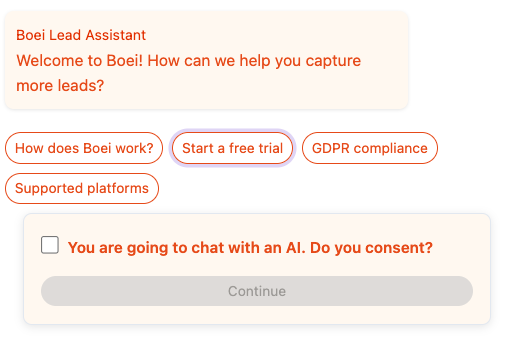
The flow works like this:
- Visitor types their first message
- The consent form appears with your custom text and a checkbox
- Visitor checks the box and clicks Continue
- The message is sent and the conversation begins normally
If you also have training tags enabled, the consent step happens first, followed by the tag questions.
Setting Up
- Go to your chatbot settings
- Scroll down to the Chat Interface section
- Find the Pre-Chat Consent field
- Enter your consent text
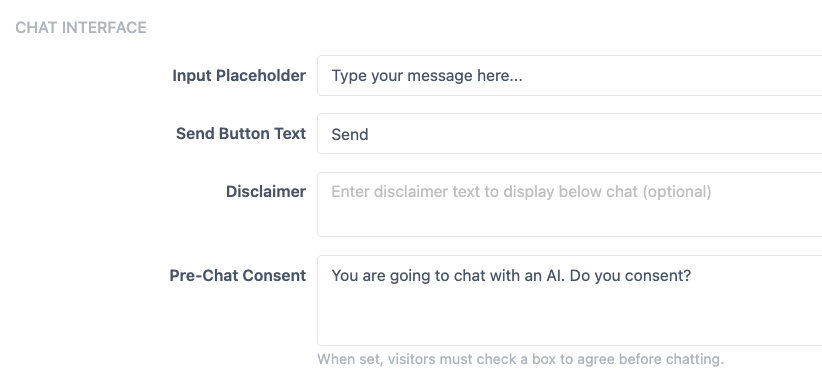
- Save your changes
The consent form will appear immediately for new conversations.
Example Texts
- "You are going to chat with an AI. Do you consent?"
- "By continuing, you agree to our Terms of Service and Privacy Policy."
- "This chat is powered by AI. Your messages may be used to improve our service. Do you agree?"
- "I consent to having my data processed for the purpose of this conversation."
Tracking Consent
When a visitor gives consent, the timestamp is automatically stored in the conversation metadata. You can see it in the inbox on the conversation detail:
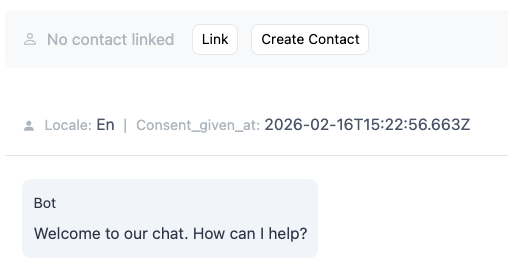
The consent_given_at field shows the exact date and time the visitor agreed, which can be useful for compliance records.
Tips
- Keep the consent text short and clear
- Leave the field empty to disable the consent step entirely
- The consent text supports up to 1,000 characters
- Consent is collected once per conversation — returning visitors in the same session won't be asked again