Inbox Playbooks
Playbooks are conversation scripts for the AI. You know those step-by-step flows your team follows — first ask this, then recommend that, then send the link? Playbooks let the AI follow the same script.
How to get there: Go to Inbox in the top menu → open any conversation → click the ⋯ menu in the conversation toolbar → Manage playbooks...
What Is a Playbook?
A playbook is a reusable conversation script (a title + a prompt) that you assign to a thread. When you generate an AI reply, the AI follows the steps in that script — on top of your regular knowledge base.
Without a playbook, the AI gives a generic helpful reply. With a playbook, it knows exactly what to ask, what to recommend, and when to share a link or close the deal.
Creating a Playbook
- Open any conversation in the Inbox
- Click the ⋯ menu in the conversation toolbar
- Click Manage playbooks...
- Click New Playbook
- Enter a Title (something short you'll recognize in the menu)
- Write the Prompt (the instructions the AI should follow)
- Click Create
Playbooks are created per website/domain, so all agents on the same domain share them.
Assigning a Playbook to a Conversation
- Open a conversation in the Inbox
- Click the ⋯ menu in the conversation toolbar
- Select a playbook under Playbook
- Generate an AI reply — it will now follow the playbook
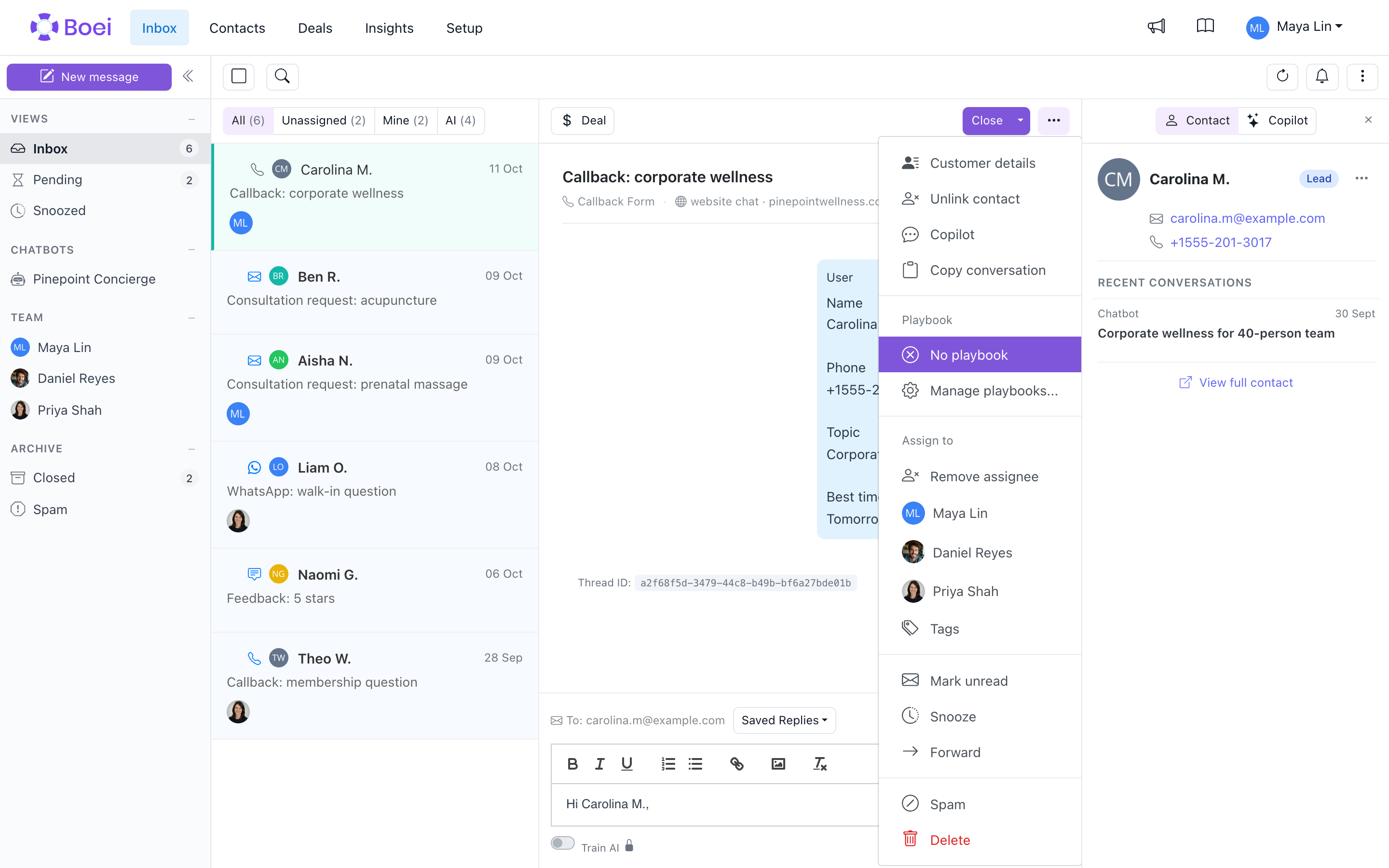
To remove a playbook, select None in that same menu. AI replies will go back to the default behavior.
Example Playbooks
Below are ready-to-use examples. Notice how each one reads like a step-by-step script — that's the key to a good playbook.
Where Is My Order?
Title: Order Status
Prompt:
Follow these steps in order:
1. Ask for the order number or email address used at checkout
2. Let them know you're looking into it and share the tracking link if available
3. If the order is delayed, apologize and give an estimated delivery date
4. If it's been more than 7 days past the estimate, offer to reship or refund

Be reassuring. Don't blame the shipping carrier.
Return or Exchange
Title: Return Request
Prompt:
Follow these steps in order:
1. Ask for the order number and which item they want to return or exchange
2. Check if it falls within the 30-day return window
3. If eligible, explain how to use the returns portal and where to ship it
4. If not eligible, apologize and offer a store credit as alternative
5. For exchanges, ask which size/color/variant they'd like instead

Be empathetic. Never argue about whether a return is justified.
Damaged or Wrong Item
Title: Damaged/Wrong Item
Prompt:
Follow these steps in order:
1. Apologize sincerely and ask for the order number
2. Ask them to share a photo of the damaged or wrong item
3. Once confirmed, offer a free replacement shipped immediately — no need to return the original
4. If the item is out of stock, offer a full refund or a similar alternative

Never ask the customer to pay for return shipping on our mistake.
Product Question (Pre-sale)
Title: Product Question
Prompt:
Follow these steps in order:
1. Answer their question using product details from the knowledge base
2. If they're comparing options, highlight the key differences and recommend one
3. Mention any active promotions or bundle deals that apply
4. Share a direct link to the product page

Be helpful, not pushy. If we don't carry what they need, say so honestly.
Discount or Coupon Issue
Title: Coupon Issue
Prompt:
Follow these steps in order:
1. Ask for the coupon code they tried and what error they saw
2. Check if the code is expired, has a minimum order value, or excludes certain items
3. If the code is valid and should work, walk them through applying it at checkout
4. If the code is expired, offer a current active promotion instead

Never create or promise custom discount codes. Only share codes we already have.
Shipping & Delivery Questions
Title: Shipping Info
Prompt:
Follow these steps in order:
1. Answer their shipping question (cost, delivery time, available countries)
2. If they haven't ordered yet, mention free shipping thresholds if we have them
3. For international orders, mention possible customs fees
4. Share a link to the full shipping policy page

Keep it short and clear. Use bullet points for multiple shipping options.
Tips for Writing Good Playbooks
- Write it as steps — "1. Ask X, 2. Then Y, 3. Then Z" works much better than a paragraph of instructions
- Be specific — "Ask for the order number" beats "get the details"
- Set the tone — Tell the AI to be empathetic, friendly, or no-nonsense
- Add guardrails — "Never offer more than 15% discount" or "Don't promise next-day shipping unless we offer it"
- One script per scenario — A focused playbook works better than a long catch-all
- Include what to do when stuck — "If the item is out of stock, offer a similar alternative"
How It Works
When you generate an AI reply on a thread with a playbook assigned, the AI follows the playbook steps alongside your knowledge base and domain settings.
If no playbook is assigned, AI replies work exactly as before — based on your knowledge base and any domain-level AI instructions in Site Settings.
Related
- AI Reply Suggestions — How AI-generated replies work
- Inbox Actions — Other things you can do in the Inbox
- Assignments — Assigning conversations to team members