Inbox Actions
Take action on inbox messages: create deals, link contacts, set reminders, reply, and export.
How to get there: Go to Inbox in the top menu → open any conversation to see available actions.
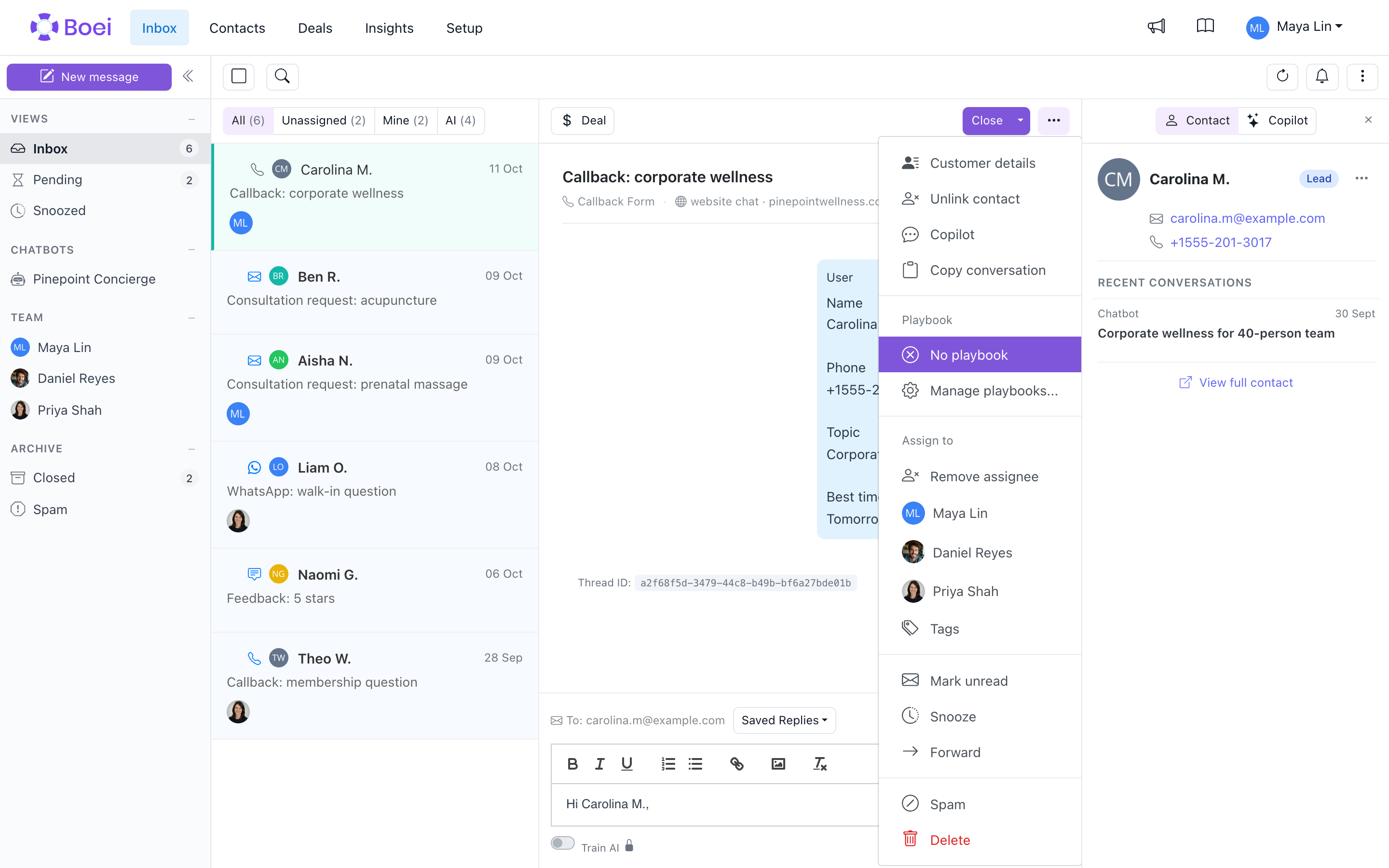
Create Deal from Message
Turn a conversation into a sales opportunity:
- Open a message in your inbox
- Click Create Deal
- Deal form opens with contact info pre-filled
- Add deal name, value, and notes
- Click Save
The deal is now linked to this contact and visible in your Deals pipeline.
Link or Create Contact
Connect messages to contact records:
Link Existing Contact
- Open the message
- Click Link Contact
- Search for the contact
- Select to link
Create New Contact
- Open the message
- Click Create Contact
- Contact is created from message info (email/phone)
- View the new contact profile
Once linked, you can see the contact's full history and details.
Set Reminders
Never forget to follow up:
- Open a message
- Click the Reminder (bell) icon
- Select date and time
- Optionally add a note
- Save the reminder
Reminder Indicators
- Bell icon - Shows reminder is set
- Notification - You're alerted when reminder is due
Clear a Reminder
- Click the reminder icon
- Click Clear Reminder
Reply to Messages
Respond directly from your inbox:
- Open the message
- Type your reply in the compose area
- Click Send
For email messages, your reply is sent as an email. For chat messages, it continues the conversation.
Live Chat Presence Signals
When you open a live chat conversation, the header shows whether the visitor is currently on the page:
- Green dot + Active - Visitor's widget is polling right now (within the last 20 seconds)
- Amber warning + Inactive - Visitor closed the tab, switched away, or lost connection
The signal flips to Inactive within about a second of a real tab close, so you know immediately whether the person is still there to read your reply.
Delivery Ticks on Agent Messages
Each message you send as an agent shows a small tick icon next to the timestamp:
- Grey single tick - Message sent, visitor has not polled yet (not received in their widget)
- Green double tick - Visitor's widget has polled since you sent the message, so it has been delivered to their screen
Delivery ticks mean the visitor's widget has the message. They do not confirm the visitor read it.
Email a Reply to an Offline Visitor
If the visitor is offline and their email is on file, the reply composer shows an Also email this reply to <email> checkbox above the message box. Leave it on to send the message as both:
- A message in the live chat (waiting for them when they return)
- A one-off email with a link back to the same conversation
The email uses your business name, the visitor's language, and reply-to matches your inbound email settings, so the visitor can just hit reply to continue the thread. A small envelope icon on the sent message confirms it was also delivered by email.
If the visitor has no email on file, you'll see a plain notice instead: they'll see the reply the next time they open the widget.
Export Inbox
Export your inbox data to Excel:
- Apply any filters you want (status, assignee, date)
- Click Export
- Download starts automatically
- Open the
.xlsxfile in Excel
What's Exported
- Message content
- Sender information
- Date and time
- Status
- Assigned team member
- Related contact info
Copy Conversation
Click Copy Conversation on an open thread to copy the full transcript as plain text to your clipboard. Handy for pasting into a ticket, an email, or internal notes without exporting the whole inbox.
Visit URL per Thread
Each thread surfaces the page URL the visitor was on when they started the conversation, so agents can immediately see the context (pricing page, checkout, a specific product) without asking.
Review Sources
See exactly which knowledge base articles your chatbot used to answer a question, and fix problems on the spot:
- Open a chatbot conversation in your inbox
- Find an AI reply that shows a Review sources link below the message
- Click it to open the sources panel on the right
The panel shows each source the AI read to build its answer. For each source you can:
- View the content the AI used (click to expand)
- Edit FAQ answers or training texts right there
- Delete a source if it contains wrong or outdated information
Update the source that contains the wrong information, then start a new test conversation to check the result.
This is also available in the chatbot preview. Go to Setup → AI agent, open the chatbot, and click Preview to test and fix answers during setup.
AI Escalations Filter
The AI escalations filter shows only conversations the AI marked for human takeover. Use it as a triage queue so agents jump straight to threads where the bot has already decided a person is needed.
Message Actions Summary
| Action | What it does |
|---|---|
| Create Deal | Start a sales opportunity from this conversation |
| Link Contact | Connect to existing contact record |
| Create Contact | Make new contact from message info |
| Set Reminder | Get notified to follow up |
| Reply | Send response to customer |
| Email offline visitor | Also send reply as email when visitor left the chat |
| Review sources | See and edit the knowledge base articles the AI used |
| Export | Download inbox data to Excel |
Related
- Inbox Overview - Basic inbox features
- Contacts - Manage contacts
- Deals - Manage your pipeline
Review or improve a chatbot answer
Open Review sources below a chatbot answer. Above the sources, choose:
- Ask Copilot to discuss the answer, for example, “Which source supports this price?” The existing inbox Copilot sidebar opens with this answer selected.
- Improve this answer to describe what should change. Click Continue. Copilot checks the answer and sources, then proposes a change to a Q&A item or a behavior instruction.
Review the full proposal before clicking Approve. Use Edit to adjust it or Decline to keep the current content. Chatting about a change does not save it.
Your earlier Copilot messages remain in the same inbox conversation. Teammates with access can see this history too. Clear beside the selected answer returns to normal reply drafting without deleting the chat. If Copilot is still answering, your improvement waits until that reply finishes.