Reorganized Boei interface
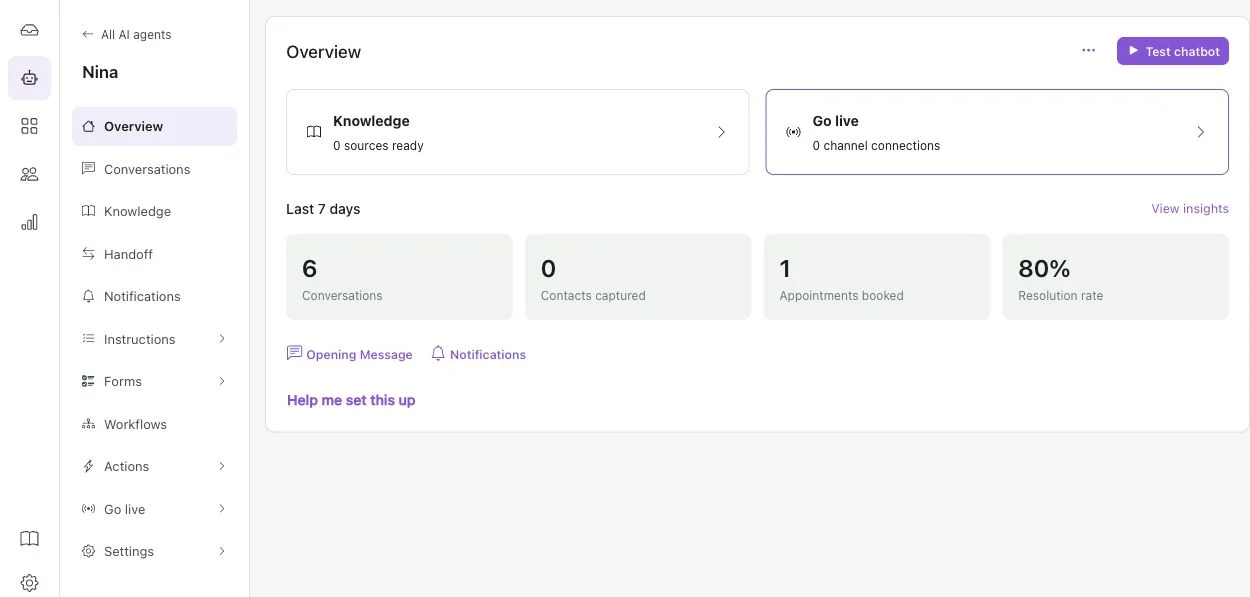
Boei's interface has been reorganized around the work you do each day. The old top menu and Setup submenu have been replaced by a main navigation bar on the left, with a second sidebar for the area you are working in.
AI agents and Widgets now have their own main sections. Contacts and Deals are grouped under CRM. Business settings, billing and People and teams are brought together under Settings.
Inside an AI agent, the sidebar groups Knowledge, Handoff, Notifications, Instructions, Forms, Workflows and Actions. This replaces the earlier mix of tabs and nested settings, so related controls are easier to find.
The app also has shared light and dark themes, with a quick appearance switch. This brings the inbox, agent setup and other workspaces into the same visual style.
 Powered by ProductLift